AXWareTS - Live Timing - extension
The Live Timing Module extends AXWareTS (PRO) to provide several forms of Live Timing content using various methods to push the timing data to the WEB or a local WEB Server. Content is report based or streamed to WEB server.
- Easy to setup and manage
- Simple select the location and method to push your data
- Select the format
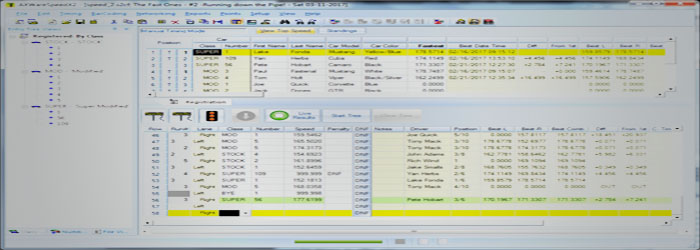
- Press the Live Timing button in the Staging Window of AXWareTS.
- Automatically manages normal events, 2 day events
- Same features in AXWareTS are also provided in our AXWareProTS (mirror cross/dual lane/Pro-solo like TS).
AXWareTS (PRO) by itself provides all the necessary timing
capabilities and event control features but is extendable via our Extendable Modules to provide additional features that help manage your event and provide additional content.
Live Timing Options
The goal of Live Timing is to give you the flexibility and options that allow you to select and tune the format of the results as well as the locations that will host your results.
Select hosting solutions:
For Broadband Support:
- Use AXWare Systems ORM for hosting your official results, including Live Timing and Dynamic content for your events. See Online Race Management for ORM subscription and events fees.
- Live Timing Results and Streamed Live Timing are Included for Clubs subscribed to ORM.
- Direct Live Timing Streaming Hosting is also available. See: ORM Live Timing Streaming
- Live Timing Content can be pushed to your own WEB server.
Lan Based Support:
- LAN based Live Timing Streaming solution is available using our turn-key AXWareLiveTimingRPI customized and integrated WEB server solution where broad band access is not provided.
- Live Timing Content can be pushed to your own LAN based web server.
Live Timing options
Select and tune the Live Timing formats based on what you'd like to see. In addition, the Live Timing formats can be adjusted and customized via the Print Templates to help you select exactly what data elements you'd like to see in the Live Timing reports. The defaults for the Live Timing formats was adopted based on feedback from our clients and should serve as a solid starting point. It may be used out of the box or fine tuned to your needs.
Live Timing Results support Smart Devices and have responsive HTML formatting. We also strive to provide essential information for the event that that it is easily and quickly viewable. Headers and footers are optional in order to provide quick and uncluttered views of the live timing data. The content is based on a efficient viewing experience and report generation, all without extraneous content that can clutter content and would normally require additional scrolling and zooming. Additional content can be provided via optional headers and footers.
Live Timing can be configured as outlined below:
- Streaming Live Timing: There are 2 methods for supporting streamed runs to WEB servers. Both require a Data Base that supports the extended features and provides very good performance and several views that provide very cool information for your event. These solutions are very similar to each other but one requires Broadband access while the other supports a turn-key WEB server on your LAN.
- Streaming to AXWare Systems ORM - with a club subscription to AXWare Systems ORM you may choose to stream live timing data to ORM directly. Access to the live timing data is possible from any browser or via our AXWare Systems Live Timing Android application. The Streaming Feed is managed automatically once selected and activated via the Live Results button in the staging grid.
Streamed Timing results can be viewed via:
- any WEB browser
- any Smart device.
- AXWare Systems Live Timing Android application - this App provides access to Live Streaming data as well as access to a Club's posted results.
- AXWareLiveTimingRPI - our turn-key Live Timing Web Server for hosting Live Timing at the event site on your Local Area Network (LAN).
- An AXWare Systems turn-key custom solution on a pre-configured Raspberry PI 3+. It simple connects it your existing router (we recommend hardwired to the high quality and powerful router).
- AXWareLiveTimingRPI must be activated before use via a very quick install step on the WEB, and must be used with with AXWareTS v17.50+.
- AXWareTS v17.5-+ provides the Streaming process to AXWareLiveTimingRPI server as each run is completed.
- AXWareLiveTimingRPI contains various Live Timing views that are not only responsive, clear, quick, but viewable via any browser, and smart devices.
- The software on the system is subject to our Licensing Agreement, All Rights Reserved.
- Report based Live Timing Results:
This method provides you with several styles of Live Timing that allow you to select the content and style of views that best serve your events. See below for Live Results Formatting options.
- Live Results directly to AXWare Systems ORM - upload results to the club Calendar in AXWare Systems ORM directly. All that is necessary is authentication information for ORM and the rest is manage automatically.
- Live Results/file based (Hot Spot support) - publish results to specified locations either on your Timing computer or to any computer on your local network, including a Hots pot (your local web server). Provide your entrants the IP or web server name to access the Live Results locally.
- FTP/SFTP (File Transfer Protocol/Secure FTP) - results are uploaded to a hosted web site, using FTP/SFTP. The web server hosts the results to a public URL that is provided to your entrants and others following the event.
Live Results Formatting
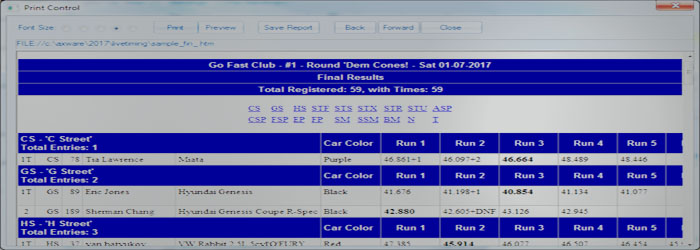
The Live Timing results formatting can be used as-is out of the box but you can customize using various content options, Print Options and Print Templates. This allows you to add or remove content and format the reports.
The default formats have been tuned and selected based on client feedback and may provide all the necessary information you require.
Live Results are generate in 2 basic formats:
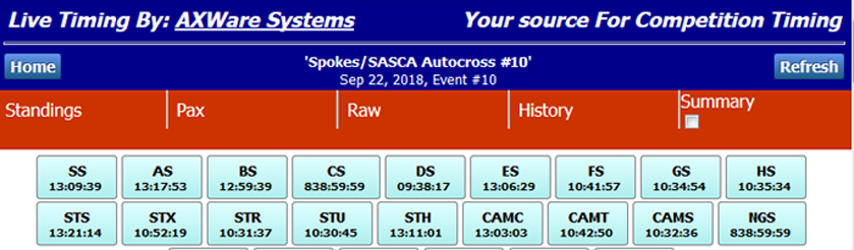
- Structured - this format contains a Home Page and individual Class Pages.
The Home Page contains:
- summary of the event
- links to individual Class pages
- Heat Summary Table that lists classes (as links) for each heat.
- Real Time Run History (up to 10 runs)
- list all classes with time stamps for each class respective to the when runs where last recorded for each class
- Optional TTOD report
Class Pages contain:
- Full Class Results
- Back button for returning to the Home Page.
- Non-Structured - this format is similar to the Final Results.
- With Heats Configured - If you are using Heats:
- Home Page is configured that provides links to individual Heat Pages.
- The Heat Pages contain the results for all respective classes running in that heat. Page links are provide to allow you to quickly move around the classes.
- Real Time Run History (up to 10 runs)
- TTOD Report
- Without Heats Configured - the Live Results are contained in a single report (1 file) providing:
- Full Results
- Real Time Run History (up to 10 runs)
- TTOD Report
- Streamed Live Timing is subject to different formatting constraints and since the data is provide from a data base, the formatting is managed via selectable data content on the web server as well as provided web server software.
Optional Live Timing Features
The Live Timing reports provide an optional Real Time Run History that lists the most recent runs for up to 10 vehicles. We expect that most will turn this feature ON since it provides a summary of the most recent runs in one concise area.
In addition, the TTOD summary may also be added to any Heat Based Live Timing in the same format is in our Final Results. Depending on your needs, another valuable option places the Total column before the Run times. The default is for the Total column to follow the Run times and thus appears on the very far right of the report.
Some Examples of Live Timing Output
With all the options for Live Timing Formats, were are a few examples that provide a glimpse as to what the reports actually look like. As mentioned above the options and format give you flexibility in how you'd like to present Live Timing for your club and drivers.
Live Timing formats can also be tuned based on Print Setting, including the Print Templates respective to the report generated. The formatting is a combination of style sheets as well as print options, and print templates.
- Structured Live Results - these results contain a Home Page, and Class pages for the results. The home page contains a Heat Table as well as list of classes with Time Stamps when a class was last updated.
- Heat Based Live Results - the same event but with a By Heat format. This provides a Home Heat Index Page and Heat based pages that correspond to complete classes assigned to each heat.
- Non heat Live Results - for clubs that do not use Heat Management, the non-heat results are automatically generated if the software detects that no heats are defined. The format is very similar to the Structured Results but does not contain any Heat tables.
Live How-to Help Videos
Below is a short series of How To Videos that demonstrate the Live Timing :Options and show how the 3 different main formats of the Live Results work. The videos were generated using v16.70+ and use a sample set of data with emulated timing
 AXWare Systems - Timing Is EVERYTHING!
 AXWare Systems - Competition Timing Systems!
 AXWare Systems - Timing Is EVERYTHING!
 AXWare Systems - Competition Timing Systems!
 AXWare Systems - Timing Is EVERYTHING!
 AXWare Systems - Competition Timing Systems!
 AXWare Systems - Timing Is EVERYTHING!